# luci-app-cd8021x
[README](README.md) | [中文说明](README_zh.md)
Configure 802.1x wired authentication on OpenWrt/LEDE
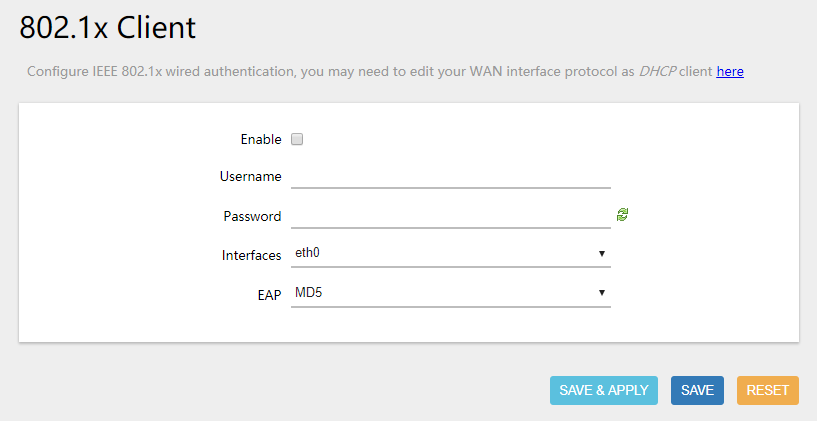
## Install
1. This package depends on *wpad*, you need to remove *wpad-mini* first, or you can manually download the *wpad* package from [OpenWrt packages site](https://downloads.openwrt.org/releases/17.01.4/packages/).
```bash
opkg update
opkg remove wpad-mini
opkg install wpad
```
2. Then download the latest version of *luci-app-cd8021x* in the [release][release_url] page
3. Upload the downloaded *ipk* file to the */tmp* directory of your router
4. Install *luci-app-cd8021x*
```bash
cd /tmp
opkg install luci-app-cd8021x_*.ipk
```
## Compile
If you want to build the package by yourself, please use OpenWrt [SDK][openwrt_sdk_url], and there are some offical guides about [using the SDK][openwrt_sdk_usage_url]
```bash
# decompress the downloaded SDK
tar -xvf openwrt-sdk-ar71xx-generic_gcc-*.tar.xz
cd openwrt-sdk-ar71xx-*
# clone this repo
git clone https://github.com/max0y/luci-app-cd8021x.git package/luci-app-cd8021x
# complie po2lmo (if you don't have po2lmo)
pushd package/luci-app-cd8021x/tool/po2lmo
make && sudo make install
popd
# run make menuconfig, and choose LuCI -> 3. Applications
make menuconfig
# start compiling
make package/luci-app-cd8021x/compile V=99
```
[release_url]: https://github.com/max0y/luci-app-cd8021x/releases
[openwrt_sdk_url]: https://downloads.lede-project.org/snapshots/targets/ar71xx/generic
[openwrt_sdk_usage_url]: https://openwrt.org/docs/guide-developer/using_the_sdk